OpenWorker
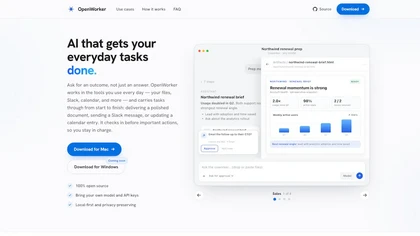
Desktop AI agent that connects to your tools — ask for an outcome, it handles the steps and checks in before acting.
| What is it | Desktop AI agent that connects to your tools — ask for an outcome, it handles the steps and checks in before acting. |
|---|---|
| Pricing | Free |
| Free tier | Yes |
| Platform | Desktop Application |
| Best for | preparing meeting briefs and follow-ups, triaging alerts and drafting incident reports |
| Domain registered | 2020 |
Data updated Sept. 19, 2026
What does OpenWorker do?
OpenWorker is a desktop AI agent that goes beyond chat — you ask for an outcome, and it works through the steps to deliver a finished document, send a Slack message, or update a calendar entry. It connects to the tools you already use, like Slack, Gmail, Outlook, Google Calendar, Notion, GitHub, Jira, and more, and runs on your own machine with your choice of model.
You bring your own AI model — OpenAI, Anthropic, Gemini, DeepSeek, Mistral, or run Ollama fully locally. OpenWorker breaks your request into a multi-step plan, pulls data from connected tools, and returns the result as a file, a chat reply, or a Slack message. Before it takes any external action — like sending an email or posting to a channel — it asks for your approval. The interface shows you each step, the artifacts it creates, and the final output. It's 100% open source and designed to keep your data local.
This tool is best for knowledge workers who want to offload repetitive research, writing, and coordination tasks without handing over control. Sales teams can use it to prep account briefs and draft follow-ups. Operations teams can triage alerts and write incident reports. Anyone with a messy calendar can ask it to untangle their day. OpenWorker is straightforward: you describe what you need, it does the work, and you approve the actions that matter.
Key features
What makes it stand outWho is OpenWorker for?
Who benefits most from this toolTrust & presence
Alternatives in Virtual employees
 Openwork
Verified
Virtual employees
Openwork
Verified
Virtual employees
Desktop app for using 50+ LLMs with your own API keys, sharing setups with your team.
 Coworker
Verified
Virtual employees
Coworker
Verified
Virtual employees
Enterprise AI agents that connect to your tools, learn workflows, and execute tasks end-to-end.
 纳米Work
Verified
Virtual employees
纳米Work
Verified
Virtual employees
AI work platform with customizable AI experts and 24/7 automated task execution
 Atomicwork
Verified
Virtual employees
Atomicwork
Verified
Virtual employees
AI platform for IT teams — deploy AI coworkers to automate service requests, incident management, and employee onboarding.
 Hyperagent
Verified
Virtual employees
Hyperagent
Verified
Virtual employees
Build and deploy a team of specialized AI agents that connect to your tools and data to solve complex tasks.
 WorkClaw
Verified
Virtual employees
WorkClaw
Verified
Virtual employees
AI coworkers that work alongside your team — handles research, scheduling, emails, and connects to 3,000+ tools
 WorkBuddy
Verified
Virtual employees
WorkBuddy
Verified
Virtual employees
AI workbench that plans, executes, and delivers office tasks end-to-end from a single sentence
 MY AI Agent
Verified
Virtual employees
MY AI Agent
Verified
Virtual employees
Build and manage a team of specialized AI agents in a Slack-like app to automate tasks like research, writing, and marketing.