
Openwork
Desktop app for using 50+ LLMs with your own API keys, sharing setups with your team.
| What is it | Desktop app for using 50+ LLMs with your own API keys, sharing setups with your team. |
|---|---|
| Pricing | Freemium — from $10/mo |
| Free tier | Yes |
| Platform | Desktop Application |
| API | Yes |
| Best for | Automating repetitive browser tasks like liking Twitter replies and exporting data, Running AI agents with custom skills and data sources |
| Domain registered | 2026 |
Data updated Sept. 19, 2026
What does Openwork do?
Openwork is a free, open-source desktop app for macOS, Windows, and Linux that lets you use AI agents to get work done on your own files. It supports over 50 language models from providers like OpenAI, Anthropic, and Google, and you bring your own API keys. The app is built on OpenCode and positions itself as an open-source alternative to Claude Cowork and Codex.
Instead of a single vendor lock-in, Openwork gives you the freedom to pick any LLM for each task. You describe what you need in plain English — like "open this Twitter thread, like all the replies, and extract user details into a CSV" — and the agent executes the steps. It can control your browser, analyze data, and interact with external tools via MCP servers. The standout feature is team sharing: you can package skills, MCP servers, plugins, and configs into a single link. A teammate clicks that link and imports everything instantly, no setup instructions needed.
Openwork works well for teams that want to standardize AI workflows without forcing everyone to be technical. The free desktop mode keeps files local; cloud plans add hosted workers and API access for enterprises. It's also useful for developers who want to point their own agent (like Codex or Cursor) at the team's shared resources. The FAQ clarifies that even non-technical users can import shared setups with one click, making it accessible beyond just engineers.
Key features
What makes it stand outWho is Openwork for?
Who benefits most from this toolPricing
Free tier available — start without a credit cardSolo
- Open source desktop app
- macOS and Linux downloads
- Bring your own keys
Team starter
- First 5 seats free
- API access
- Extension Marketplace
- Bring your own LLM keys, distributed to your team
Enterprise
Everything in Team starter, plus:
- SSO / SAML and SCIM provisioning
- Bring your own inference — self-hosted or private models
- Desktop policies and version controls
- Managed deployment, self-hosted or hosted
- Custom skill development and MCP consulting
- Enterprise rollout support and custom commercial terms
Trust & presence
Gallery
Click any image to enlargeAlternatives in Virtual employees
 OpenWorker
Verified
Virtual employees
OpenWorker
Verified
Virtual employees
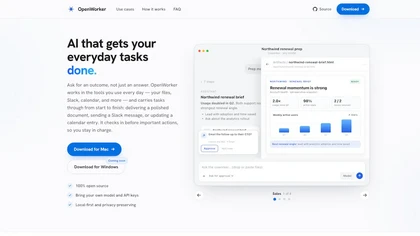
Desktop AI agent that connects to your tools — ask for an outcome, it handles the steps and checks in before acting.
 Coworker
Verified
Virtual employees
Coworker
Verified
Virtual employees
Enterprise AI agents that connect to your tools, learn workflows, and execute tasks end-to-end.
 Atomicwork
Verified
Virtual employees
Atomicwork
Verified
Virtual employees
AI platform for IT teams — deploy AI coworkers to automate service requests, incident management, and employee onboarding.
 纳米Work
Verified
Virtual employees
纳米Work
Verified
Virtual employees
AI work platform with customizable AI experts and 24/7 automated task execution
 Eigent AI
Verified
Virtual employees
Eigent AI
Verified
Virtual employees
Open-source desktop AI cowork app — turn a prompt into agents that research, write, and process files on your machine.
 Clairvoyance
Verified
Virtual employees
Clairvoyance
Verified
Virtual employees
Free AI agent desktop app — direct a team of agents that work in your real files, remember, and stay local.
 Bloome
Verified
Virtual employees
Bloome
Verified
Virtual employees
A desktop app where specialized AI agents work together as a team to handle complex tasks like development, research, and content creation.
 MY AI Agent
Verified
Virtual employees
MY AI Agent
Verified
Virtual employees
Build and manage a team of specialized AI agents in a Slack-like app to automate tasks like research, writing, and marketing.
Similar tools
 OpenOwl
Verified
Automation
OpenOwl
Verified
Automation
AI desktop automation tool — connects to your AI assistant to control apps, click buttons, and complete tasks on your computer.
 Nanobrowser
Verified
Automation
Nanobrowser
Verified
Automation
AI web agent that runs in your browser — open source alternative to OpenAI Operator with flexible LLM options
 OpenComputer
Verified
Developer Tools
OpenComputer
Verified
Developer Tools
Deploy and manage AI agents with a permanent URL and mid-run steerability, without managing infrastructure.
 Clockwork
Verified
Developer Tools
Clockwork
Verified
Developer Tools
Schedule AI agent tasks on a real calendar — book, run, review, and repeat with isolated sandbox execution