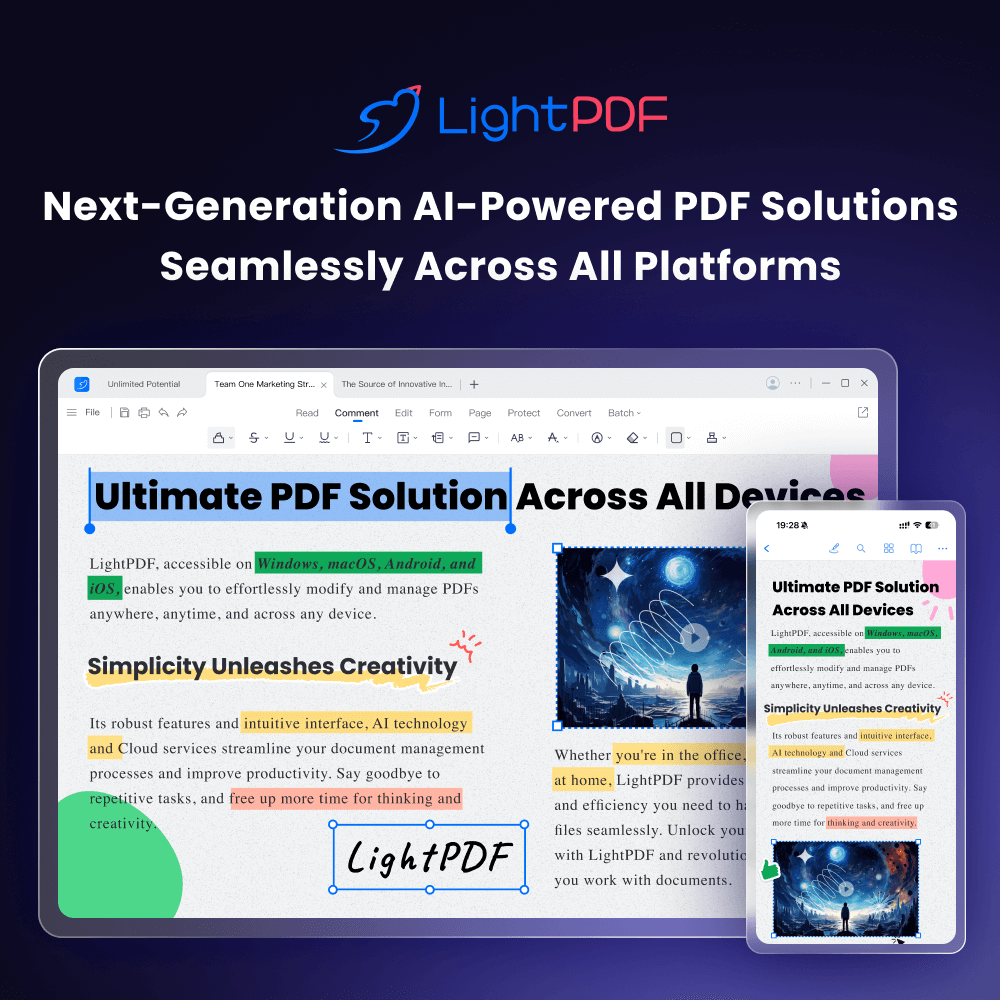
LightPDF
AI-powered online PDF editor — edit, convert, OCR, sign, and chat with your documents across all devices.
| What is it | AI-powered online PDF editor — edit, convert, OCR, sign, and chat with your documents across all devices. |
|---|---|
| Pricing | Freemium — from $9.9/mo |
| Free tier | Yes |
| Platform | Web Application |
| API | Yes |
| Best for | editing and annotating PDF documents, converting documents between formats |
| Domain registered | 2013 |
Data updated Oct. 3, 2026
What does LightPDF do?
LightPDF is a comprehensive online toolkit that handles virtually everything you'd want to do with PDF files. It lets you edit text and images directly in PDFs (much like a word processor), convert files to and from various formats (Word, Excel, images), perform OCR to extract text from scanned documents, add digital signatures, annotate with comments, and even compress or merge files. What sets it apart is its AI integration: the 'ChatPDF' feature allows you to upload documents and ask an AI questions about the content, getting summaries, explanations, or specific information extracted instantly. It's also fully cross-platform, with web, desktop, and mobile apps that sync your documents through cloud storage.
The tool stands out by packing these features into a clean, accessible interface that works right in your browser, eliminating the need for expensive desktop software. The AI chat function is particularly clever for quickly digesting long reports or contracts. While some advanced features might require the desktop app, the core online tools are free to use, making it practical for everyday tasks.
This is ideal for students, office workers, and anyone who regularly deals with documents. Students can use the OCR to digitize textbook excerpts and the AI to summarize research papers. Professionals can edit contracts, add e-signatures to forms, or quickly extract data from PDF reports. It's essentially for anyone who's ever thought, 'I wish I could just edit this PDF instead of starting over.'
Key features
What makes it stand outWho is LightPDF for?
Who benefits most from this toolPricing
Free tier available — start without a credit cardMonthly Plan
- 1,000 AI credits
- 1 validity months
- 1-month full access to all PDF tools
- 1000 AI credits, 1-month validity
- Chat, summarize, analyze, and ask PDFs
- Remove watermarks from PDFs & images
- Generate PDFs with simple prompts
- Turn ideas into presentations
- Create mindmaps from docs/text/URLs
- Translate PDFs in 20+ languages
Annual Plan
- 1 validity months
- 1,000 AI credits per month
- 1-year full access to all PDF tools
- 1000 AI credits/month, 1-month validity
- Chat, summarize, analyze, and ask PDFs
- Remove watermarks from PDFs & images
- Generate PDFs with simple prompts
- Turn ideas into presentations
- Create mindmaps from docs/text/URLs
- Translate PDFs in 20+ languages
Perpetual Plan
- 40,000 AI credits
- Lifetime access to all PDF tools
- 40000 credits received instantly
- Chat, summarize, analyze, and ask PDFs
- Remove watermarks from PDFs & images
- Generate PDFs with simple prompts
- Turn ideas into presentations
- Create mindmaps from docs/text/URLs
- Translate PDFs in 20+ languages
Pay-As-You-Go
- Low-cost way to try it out
- One-time purchase, lifetime validity
Trust & presence
Gallery
Click any image to enlargeAlternatives in Productivity Tools
 SwifDoo PDF
Verified
Productivity Tools
SwifDoo PDF
Verified
Productivity Tools
AI-powered PDF editor for Windows and Mac — edit text, convert formats, sign documents, and chat with your PDFs.
 Amplenote
Verified
Productivity Tools
Amplenote
Verified
Productivity Tools
Note-taking and task app with AI agents, mood tracking, and quarterly goal planning
 Slik Safe
Verified
Productivity Tools
Slik Safe
Verified
Productivity Tools
Desktop file manager with ultrafast search across local and cloud storage, plus an AI chatbot to find info in your files.
 Wispr Flow
Verified
Productivity Tools
Wispr Flow
Verified
Productivity Tools
Voice-to-text AI that turns speech into clear, polished writing in every app
 Twos
Verified
Productivity Tools
Twos
Verified
Productivity Tools
AI-powered note-taking app — capture notes, to-dos, reminders, and lists in one simple place.
 socra AI
Verified
Productivity Tools
socra AI
Verified
Productivity Tools
AI goal achievement platform — create journeys, get AI agent assistance, and track progress toward personal and professional goals
 IXORD
Verified
Productivity Tools
IXORD
Verified
Productivity Tools
AI-powered note-taking app with task management, calendar sync, and secure encryption for organizing work and personal projects.
 Zovia Studio
Verified
Productivity Tools
Zovia Studio
Verified
Productivity Tools
A mobile app studio creating calm, AI-powered apps for family organization, inventory, and personal productivity.
Similar tools
 ChatPDF
Verified
Assistant
ChatPDF
Verified
Assistant
AI tool that lets you chat with PDFs — upload a document and ask questions to get instant summaries and answers.
 DeepPDF
Verified
Research Tool
DeepPDF
Verified
Research Tool
AI tool to chat with PDFs, translate, summarize, and analyze images and formulas within documents.
 aiPDF
Verified
Research Tool
aiPDF
Verified
Research Tool
Chat with any PDF — upload documents, ask questions, and get AI-powered summaries with source references.
 PDF.ai
Verified
Assistant
PDF.ai
Verified
Assistant
AI tool to chat with PDFs, extract data, and parse documents via a web app or API.
 Chat PDF AI
Verified
Knowledge Management
Chat PDF AI
Verified
Knowledge Management
AI-powered PDF assistant — chat with documents, get summaries, and translate content instantly
 ChatPDF.ae
Verified
Knowledge
ChatPDF.ae
Verified
Knowledge
AI tool that lets you chat with PDFs — ask questions, get summaries, and extract insights instantly.
 ChatPDFGPT
Verified
Assistant
ChatPDFGPT
Verified
Assistant
AI tool that lets you chat with PDF files — ask questions, get summaries, and extract key information instantly.
 EaseMate - Your AI Partner for Seamless Creativity and Productivity
Research Tool
EaseMate - Your AI Partner for Seamless Creativity and Productivity
Research Tool
AI tool to chat with, summarize, and translate PDFs, PPTs, and Word documents for free.